O LogParser é uma tool potente de utilização em Windows para fazer pesquisa em Logs de IIS ou outros.
Tem parametrizações especificas para vários tipos de Logs.
Sites com info:
http://technet.microsoft.com/pt-br/library/cc779255(v=ws.10).aspx
http://technet.microsoft.com/en-us/scriptcenter/dd919274.aspx
http://support.microsoft.com/kb/910447
http://en.wikipedia.org/wiki/Logparser
Exemplos vários para LogParser:
Comando LOG PARSER
==> CSV
logparser "SELECT Count(EventID) AS Contador, ComputerName, EventID, EventTypeName, to_string(TimeGenerated,'yyyy-MM-dd hh:mm') AS DateEvent, Strings from *.evt to EventViewerVDFAPPs_v2.csv WHERE TimeGenerated > timestamp('01-03-2011', 'dd-MM-yyyy') AND Strings
like'%Fail to obtain widget menu%' GROUP BY ComputerName, EventID, EventTypeName, DateEvent, Strings ORDER BY DateEvent Desc" -o:CSV
==> XML
logparser "SELECT Count(EventID) AS Contador, ComputerName, EventID, EventTypeName, to_string(TimeGenerated,'yyyy-MM-dd hh:mm') AS DateEvent, Strings from *.evt to EventViewerVDFAPPs_v2.xml WHERE TimeGenerated > timestamp('01-03-2011', 'dd-MM-yyyy') AND Strings
like'%exception%' GROUP BY ComputerName, EventID, EventTypeName, DateEvent,Strings ORDER BY DateEvent Desc" -o:XML
-- PPI: Comando para ficheiros log de IIS e apanhar webservices e erros 500logparser "SELECT * FROM *.log to pires500.csv WHERE TEXT LIKE '%GETGROUPGRANTEDKEYS%' AND TEXT LIKE '% 500 %' " -o:csv
logparser ComputerName, EventId, EventType, SourceName, count(*) From 'STG-ASVR-*.Application.evt' to 'EventLogResult.csv' group by computername, eventId, EventType, SourceName Order By computername, eventtype, eventid" -o:CSV
logparser "Select ComputerName,to_string(TimeGenerated,'yyyy-MM-dd') as Day, EventTypeName, count(*) From 'STG-ASVR-*.Application.evt' to 'EventLogResult.csv' group by computername, Day, EventTypeName Order By computername, Day, eventtypeName" -o:CSV
-- PPI: Obtem os dados do EventViewer para um CSV do Evento 16571 (CCSKIPS)logparser "SELECT Count(EventID) AS Contador, ComputerName, EventID, EventTypeName, to_string(TimeGenerated,'yyyy-MM-dd hh:mm') AS DateEvent from mon-asvr-*_App.evt to EventViewerMON_ASVR.csv WHERE EventID = 16571 GROUP BY ComputerName, EventID, EventTypeName,
DateEvent ORDER BY DateEvent Desc" -o:CSV
-- PPI: Obtem dados dentro de um determinado período
logparser "SELECT ComputerName, EventID, EventTypeName, Strings, to_string(TimeGenerated,'yyyy-MM-dd hh:mm') AS DateEvent from CAX-DSVR-02_App.evt WHERE TimeGenerated < timestamp('30-09-2008','dd-MM-yyyy') AND TimeGenerated > timestamp('20-09-2008', 'dd-MM-yyyy')
GROUP BY ComputerName, EventID, EventTypeName, Strings, DateEvent ORDER BY DateEvent Desc"
logparser "SELECT ComputerName, EventID, EventTypeName, Strings, to_string(TimeGenerated,'yyyy-MM-dd hh:mm') AS DateEvent from CAX-DSVR-02_App.evt WHERE TimeGenerated < timestamp('30-09-2008','dd-MM-yyyy') AND TimeGenerated > timestamp('20-09-2008', 'dd-MM-yyyy')
GROUP BY ComputerName, EventID, EventTypeName, Strings, DateEvent ORDER BY DateEvent Desc"
-- PPI: Obter dados do Strings também (sem o Enter > falta descobrir o char)logparser "SELECT ComputerName, EventID, EventTypeName, to_string(TimeGenerated,'yyyy-MM-dd hh:mm') AS DateEvent, REPLACE_CHR(Message, '£', '') AS Message from CAX-DSVR-02_App.evt to Pesquisa.csv WHERE TimeGenerated < timestamp('30-09-2008','dd-MM-yyyy') AND
TimeGenerated > timestamp('20-09-2008', 'dd-MM-yyyy') GROUP BY ComputerName, EventID, EventTypeName, Message, DateEvent ORDER BY DateEvent Desc" -o:CSV
-- PPI: Obter dados de servidoreslogparser "SELECT ComputerName, EventId, EventTypeName, to_string(TimeGenerated, 'yyyy-MM-dd hh:mm') AS EventDate, Count(1) as CountEvents FROM EventLog_20081015.evt where EventId = 14206 GROUP BY ComputerName, EventID, EventTypeName, EventDate ORDER BY
EventDate DESC"
-- PPI: Looking for IP
logparser "SELECT ComputerName, EventId, EventTypeName, to_string(TimeGenerated, 'yyyy-MM-dd hh:mm') AS EventDate, Count(1) as CountEvents FROM EventLog_20081015.evt where EventId = 14206 and Strings like '%10.193.219.107%' GROUP BY ComputerName, EventID,
EventTypeName, EventDate ORDER BY EventDate DESC"
logparser "SELECT ComputerName, EventId, EventTypeName, to_string(TimeGenerated, 'yyyy-MM-dd hh:mm') AS EventDate, Count(1) as CountEvents FROM EventLog_20081015.evt where EventId = 14206 and Strings not like '%10.193.219.107%' GROUP BY ComputerName, EventID,
EventTypeName, EventDate ORDER BY EventDate DESC"
-- PPI: Para um determinado EventIDlogparser "SELECT UserName, ComputerName, EventId, EventTypeName, to_string(TimeGenerated, 'yyyy-MM-dd hh:mm') AS EventDate FROM *.evt to 'EventsSFB01_12994' where EventId = 12994 ORDER BY EventDate DESC" -o:csv
logparser "SELECT ComputerName, EventId, EventTypeName, to_string(TimeGenerated, 'yyyy-MM-dd hh:mm') AS EventDate, Count(1) as CountEvents FROM *.evt to 'EventsSFB01_12994' where EventId = 12994 GROUP BY ComputerName, EventID, EventTypeName, EventDate ORDER BY
EventDate DESC" -o:csv
-- PPI: Para obter uma lista em XML de uma determinada string em Logs de IISLogParser -i:TEXTLINE "SELECT * FROM \\Alfr-log-01\LogsConsolidation\Repository\W3C3\*.log WHERE Text like '%PromoFriends.jpg%'" -o:xml > C:\Oper\LogParser\WIDGETS\PromoFriends2.xml
segunda-feira, novembro 19, 2012

quarta-feira, novembro 14, 2012
Most Common FTP errors
| Code | Description |
|---|---|
| 100 Codes | The requested action is being taken. Expect a reply before proceeding with a new command. |
| 110 | Restart marker reply. |
| 120 | Service ready in (n) minutes. |
| 125 | Data connection already open, transfer starting. |
| 150 | File status okay, about to open data connection. |
| 200 Codes | The requested action has been successfully completed. |
| 200 | Command okay. |
| 202 | Command not implemented |
| 211 | System status, or system help reply. |
| 212 | Directory status. |
| 213 | File status. |
| 214 | Help message. |
| 215 | NAME system type. (NAME is an official system name from the list in the Assigned Numbers document.) |
| 220 | Service ready for new user. |
| 221 | Service closing control connection. (Logged out if appropriate.) |
| 225 | Data connection open, no transfer in progress. |
| 226 | Closing data connection. Requested file action successful (file transfer, abort, etc.). |
| 227 | Entering Passive Mode |
| 230 | User logged in, proceed. |
| 250 | Requested file action okay, completed. |
| 257 | "PATHNAME" created. |
| 300 Codes | The command has been accepted, but the requested action is being held pending receipt of further information. |
| 331 | User name okay, need password. |
| 332 | Need account for login. |
| 350 | Requested file action pending further information. |
| 400 Codes | The command was not accepted and the requested action did not take place. The error condition is temporary, however, and the action may be requested again. |
| 421 | Service not available, closing control connection. (May be a reply to any command if the service knows it must shut down.)` |
| 425 | Can't open data connection. |
| 426 | Connection closed, transfer aborted. |
| 450 | Requested file action not taken. File unavailable (e.g., file busy). |
| 451 | Requested action aborted, local error in processing. |
| 452 | Requested action not taken. Insufficient storage space in system. |
| 500 Codes | The command was not accepted and the requested action did not take place. |
| 500 | Syntax error, command unrecognized. This may include errors such as command line too long. |
| 501 | Syntax error in parameters or arguments. |
| 502 | Command not implemented. |
| 503 | Bad sequence of commands. |
| 504 | Command not implemented for that parameter. |
| 530 | User not logged in. |
| 532 | Need account for storing files. |
| 550 | Requested action not taken. File unavailable (e.g., file not found, no access). |
| 552 | Requested file action aborted, storage allocation exceeded |
| 553 | Requested action not taken. Illegal file name. |
http://www.theegglestongroup.com/writing/ftp_error_codes.php
segunda-feira, novembro 12, 2012
Lista de ocupação por diretorias
Quando em DOS temos problemas em obter uma lista da ocupação de diretorias, poder-se-á usar o seguinte script e comando:
diskusage.bat [dir] /L > ficOutput.txt
=============================================
@ECHO OFF
CLS
:: Use local variables
IF "%OS%"=="Windows_NT" SETLOCAL
:: Check command line arguments and Windows version
ECHO.%1 | FIND "/" >NUL
IF NOT ERRORLEVEL 1 IF /I NOT "%~1"=="/L" GOTO Syntax
ECHO.%1 | FIND "?" >NUL
IF NOT ERRORLEVEL 1 GOTO Syntax
ECHO.%1 | FIND "*" >NUL
IF NOT ERRORLEVEL 1 GOTO Syntax
IF NOT "%OS%"=="Windows_NT" GOTO Syntax
IF NOT "%~1"=="" IF /I NOT "%~1"=="/L" IF NOT EXIST "%~1" GOTO Syntax
SET LongFormat=1
IF /I NOT "%~1"=="/L" IF /I NOT "%~2"=="/L" SET LongFormat=0
:: Go to start directory
SET StartDir=%CD%
IF NOT "%~1"=="" IF /I NOT "%~1"=="/L" SET StartDir=%~1
PUSHD "%StartDir%"
IF ERRORLEVEL 1 GOTO Syntax
:: Display header
ECHO Directory Space used (MB)
ECHO.========= ===============
:: Display disk usage for start directory
IF NOT EXIST *.* GOTO SubDirs
FOR /F "tokens=3,4*" %%A IN ('DIR %1 /A-D /-C ^| FIND /I "File(s)"') DO SET ListDir=%%A
:: Different procedures depending on /L switch
IF "%LongFormat%"=="1" GOTO LongFormat
SET /A ListDir=%ListDir%+524288
SET /A ListDir=%ListDir%/1048576
ECHO..\ %ListDir%
SET ListDir=
GOTO SubDirs
:LongFormat
:: Strip last 6 digits from value
SET ListDir=%ListDir:~0,-6%
IF NOT DEFINED ListDir SET ListDir=0
:: Display resulting value in MB
ECHO..\ %ListDir%
:: Clear variable
SET ListDir=
:: Display disk usage for every subdirectory
:SubDirs
FOR /D %%A IN (*.*) DO CALL :List%LongFormat% "%%~A"
:: Done
POPD
GOTO End
:List0
:: Set variable value to bytes used by directory
FOR /F "tokens=3,4*" %%B IN ('DIR /A /-C /S "%~1" ^| FIND /I "File(s)"') DO SET ListDir=%%~B
:: Add 0.5MB in order to properly round the value when integer divided by 1MB
SET /A ListDir=%ListDir%+524288
:: Integer divide by 1MB
SET /A ListDir=%ListDir%/1048576
:: Display resulting value in MB
ECHO.%~1 %ListDir%
:: Clear variable
SET ListDir=
GOTO:EOF
:List1
:: Set variable value to bytes used by directory
FOR /F "tokens=3,4*" %%B IN ('DIR /A /-C /S "%~1" ^| FIND /I "File(s)"') DO SET ListDir=%%~B
:: Strip last 6 digits from value
SET ListDir=%ListDir:~0,-6%
IF NOT DEFINED ListDir SET ListDir=0
:: Display resulting value in MB
ECHO.%~1 %ListDir%
:: Clear variable
SET ListDir=
GOTO:EOF
:Syntax
ECHO.
ECHO DiskUse, Version 5.01 for Windows 2000 / XP
ECHO Display disk space used by subdirectories (tab delimited)
ECHO.
ECHO Usage: DISKUSE [ startdir ] [ /L ]
ECHO.
ECHO Where: "startdir" is the directory containing subdirectories to be
ECHO inventoried (default is the current directory)
ECHO "/L" is used for large numbers, over 2GB, to prevent return
ECHO of negative numbers due to batch math limitations
ECHO (integer division by 1000000 instead of properly
ECHO rounded mathematical division by 1048576)
ECHO.
ECHO Written by Rob van der Woude
ECHO http://www.robvanderwoude.com
:End
IF "%OS%"=="Windows_NT" ENDLOCAL
=============================================
Resultado:
Directory Space used (MB)
========= ===============
.\ 0
Dir1 8893
Dir2 29
Dir3 29
Dir4 1334
Dir5 1333
Dir6 1463
Dir7 1326
Dir8 1546
Link Original:
http://www.tomshardware.co.uk/forum/117561-35-folder-size-command
Script Original:
http://www.robvanderwoude.com/files/diskuse_2k.txt
diskusage.bat [dir] /L > ficOutput.txt
=============================================
@ECHO OFF
CLS
:: Use local variables
IF "%OS%"=="Windows_NT" SETLOCAL
:: Check command line arguments and Windows version
ECHO.%1 | FIND "/" >NUL
IF NOT ERRORLEVEL 1 IF /I NOT "%~1"=="/L" GOTO Syntax
ECHO.%1 | FIND "?" >NUL
IF NOT ERRORLEVEL 1 GOTO Syntax
ECHO.%1 | FIND "*" >NUL
IF NOT ERRORLEVEL 1 GOTO Syntax
IF NOT "%OS%"=="Windows_NT" GOTO Syntax
IF NOT "%~1"=="" IF /I NOT "%~1"=="/L" IF NOT EXIST "%~1" GOTO Syntax
SET LongFormat=1
IF /I NOT "%~1"=="/L" IF /I NOT "%~2"=="/L" SET LongFormat=0
:: Go to start directory
SET StartDir=%CD%
IF NOT "%~1"=="" IF /I NOT "%~1"=="/L" SET StartDir=%~1
PUSHD "%StartDir%"
IF ERRORLEVEL 1 GOTO Syntax
:: Display header
ECHO Directory Space used (MB)
ECHO.========= ===============
:: Display disk usage for start directory
IF NOT EXIST *.* GOTO SubDirs
FOR /F "tokens=3,4*" %%A IN ('DIR %1 /A-D /-C ^| FIND /I "File(s)"') DO SET ListDir=%%A
:: Different procedures depending on /L switch
IF "%LongFormat%"=="1" GOTO LongFormat
SET /A ListDir=%ListDir%+524288
SET /A ListDir=%ListDir%/1048576
ECHO..\ %ListDir%
SET ListDir=
GOTO SubDirs
:LongFormat
:: Strip last 6 digits from value
SET ListDir=%ListDir:~0,-6%
IF NOT DEFINED ListDir SET ListDir=0
:: Display resulting value in MB
ECHO..\ %ListDir%
:: Clear variable
SET ListDir=
:: Display disk usage for every subdirectory
:SubDirs
FOR /D %%A IN (*.*) DO CALL :List%LongFormat% "%%~A"
:: Done
POPD
GOTO End
:List0
:: Set variable value to bytes used by directory
FOR /F "tokens=3,4*" %%B IN ('DIR /A /-C /S "%~1" ^| FIND /I "File(s)"') DO SET ListDir=%%~B
:: Add 0.5MB in order to properly round the value when integer divided by 1MB
SET /A ListDir=%ListDir%+524288
:: Integer divide by 1MB
SET /A ListDir=%ListDir%/1048576
:: Display resulting value in MB
ECHO.%~1 %ListDir%
:: Clear variable
SET ListDir=
GOTO:EOF
:List1
:: Set variable value to bytes used by directory
FOR /F "tokens=3,4*" %%B IN ('DIR /A /-C /S "%~1" ^| FIND /I "File(s)"') DO SET ListDir=%%~B
:: Strip last 6 digits from value
SET ListDir=%ListDir:~0,-6%
IF NOT DEFINED ListDir SET ListDir=0
:: Display resulting value in MB
ECHO.%~1 %ListDir%
:: Clear variable
SET ListDir=
GOTO:EOF
:Syntax
ECHO.
ECHO DiskUse, Version 5.01 for Windows 2000 / XP
ECHO Display disk space used by subdirectories (tab delimited)
ECHO.
ECHO Usage: DISKUSE [ startdir ] [ /L ]
ECHO.
ECHO Where: "startdir" is the directory containing subdirectories to be
ECHO inventoried (default is the current directory)
ECHO "/L" is used for large numbers, over 2GB, to prevent return
ECHO of negative numbers due to batch math limitations
ECHO (integer division by 1000000 instead of properly
ECHO rounded mathematical division by 1048576)
ECHO.
ECHO Written by Rob van der Woude
ECHO http://www.robvanderwoude.com
:End
IF "%OS%"=="Windows_NT" ENDLOCAL
=============================================
Resultado:
Directory Space used (MB)
========= ===============
.\ 0
Dir1 8893
Dir2 29
Dir3 29
Dir4 1334
Dir5 1333
Dir6 1463
Dir7 1326
Dir8 1546
Link Original:
http://www.tomshardware.co.uk/forum/117561-35-folder-size-command
Script Original:
http://www.robvanderwoude.com/files/diskuse_2k.txt
sexta-feira, outubro 12, 2012
Pesquisa Runtime no History em Linux
Para quem não sabe, se quando estão na linha de comando
fizerem CTRL+R aparece a prompt abaixo e podem iniciar a escrever e acabarão
por conseguir navegar no histórico de comandos, apanhando o último que fizeram
e basta fazer enter assim que ele reconhecer o comando.
~]$
(reverse-i-search)`cd lo': cd log/
terça-feira, outubro 09, 2012
WGET command
If you have a proxy you will need to start with this command
$ export http_proxy=http://100.1.1.1:8080
And then you just need to call the site
$ wget -O- http://www.google.pt
The result should be like this - getting all the HTML page:
--12:37:20-- http://www.google.pt/
Connecting to 100.1.1.1:8080... connected.
Proxy request sent, awaiting response... 200 OK
Length: unspecified [text/html]
Saving to: `STDOUT'
[<=> ] 0 --.-K/s <html itemscope="itemscope" itemtype="http://schema.org/WebPage"><head><title>Google</title><script>window.google={kEI:"cAx0UKm4DvCX0QWshYGYBA",getEI:function(a){var b;while(a&&!(a.getAttribute&&(b=a.getAttribute("eid"))))a=a.parentNode;return b||google.kEI},https:function(){return window.location.protocol=="https:"},kEXPI:"17259,23628,32690,35704,39523,39978,4000116,4000354,4000553,4000624,4000648,4000743,4000833,4000955,4001001,4001013,4001064,4001132,4001145,4001188,4001192,4001267,4001293,4001441,4001449,4001461",kCSI:{e:"17259,23628,32690,35704,39523,39978,4000116,4000354,4000553,4000624,4000648,4000743,4000833,4000955,4001001,4001013,4001064,4001132,4001145,4001188,4001192,4001267,4001293,4001441,4001449,4001461",ei:"cAx0UKm4DvCX0QWshYGYBA"},authuser:0,
ml:function(){},kHL:"pt-PT",time:function(){return(new Date).getTime()},log:function(a,b,c,e){var d=new Image,h=google,i=h.lc,f=h.li,j="";d.onerror=(d.onload=(d.onabort=function(){delete i[f]}));i<
...
(google.stt!==undefined)google.kCSI.stt=google.stt;google.csiReport&&google.csiReport()}if(window.addEventListener)window.addEventListener("load",
l,false);else if(window.attachEvent)window.attachEvent("onload",l);google.timers.load.t.prt=(f=(new Date).getTime());
})();
[ <=> ] 11,527 --.-K/s in 0.001s
12:37:20 (20.6 MB/s) - `-' saved [11527]
</script></body></html>
$ export http_proxy=http://100.1.1.1:8080
And then you just need to call the site
$ wget -O- http://www.google.pt
The result should be like this - getting all the HTML page:
--12:37:20-- http://www.google.pt/
Connecting to 100.1.1.1:8080... connected.
Proxy request sent, awaiting response... 200 OK
Length: unspecified [text/html]
Saving to: `STDOUT'
[<=> ] 0 --.-K/s <html itemscope="itemscope" itemtype="http://schema.org/WebPage"><head><title>Google</title><script>window.google={kEI:"cAx0UKm4DvCX0QWshYGYBA",getEI:function(a){var b;while(a&&!(a.getAttribute&&(b=a.getAttribute("eid"))))a=a.parentNode;return b||google.kEI},https:function(){return window.location.protocol=="https:"},kEXPI:"17259,23628,32690,35704,39523,39978,4000116,4000354,4000553,4000624,4000648,4000743,4000833,4000955,4001001,4001013,4001064,4001132,4001145,4001188,4001192,4001267,4001293,4001441,4001449,4001461",kCSI:{e:"17259,23628,32690,35704,39523,39978,4000116,4000354,4000553,4000624,4000648,4000743,4000833,4000955,4001001,4001013,4001064,4001132,4001145,4001188,4001192,4001267,4001293,4001441,4001449,4001461",ei:"cAx0UKm4DvCX0QWshYGYBA"},authuser:0,
ml:function(){},kHL:"pt-PT",time:function(){return(new Date).getTime()},log:function(a,b,c,e){var d=new Image,h=google,i=h.lc,f=h.li,j="";d.onerror=(d.onload=(d.onabort=function(){delete i[f]}));i<
...
(google.stt!==undefined)google.kCSI.stt=google.stt;google.csiReport&&google.csiReport()}if(window.addEventListener)window.addEventListener("load",
l,false);else if(window.attachEvent)window.attachEvent("onload",l);google.timers.load.t.prt=(f=(new Date).getTime());
})();
[ <=> ] 11,527 --.-K/s in 0.001s
12:37:20 (20.6 MB/s) - `-' saved [11527]
</script></body></html>
segunda-feira, outubro 08, 2012
How to Add Background Music to Your Web Page
The best I prefere
For Opera and all IE versions, the following code works:
As you probably have noticed, IE 3.0 and above support both methods, so you cannot simply put both those tags into your web document in the hope of supporting all browsers. It will work on Netscape and early versions of IE, but the newer versions of IE will recognize both tags, leading to problems when IE tries to load the music file twice.
The workaround that I've seen on some sites, that seems to work for me, is to enclose the BGSOUND tag inside NOEMBED tags, thus preventing IE from interpreting the second tag.
<bgsound src="yourmusicfile.mid" loop="infinite">
This code appears to be compatible with all versions of IE, Netscape and Opera.
How to Add Background Music to Your Web Page
terça-feira, outubro 02, 2012
FINDSTR to get smaller log files
Quando os logs estão a ficar muito grandes e quiserem fazer uma pesquisa
dentro das máquinas windows podem e devem usar
o comando abaixo:
findstr /s /i /C:"[texto a pesquisa]" "*.*" > "[Nome do Ficheiro onde ficam os logs]"
findstr /s /i /C:"[texto a pesquisa]" "*.*" > "[Nome do Ficheiro onde ficam os logs]"
domingo, setembro 30, 2012
Where to download Microsoft Visual Studio 2008 Express Edition
The Microsoft Visual Studio 2008 Express Editions are a free set of tools that are simple, fun and easy to learn. Continuing the Microsoft tradition of enabling developers of all skill levels, this latest release enables hobbyists, students, experienced and casual developers alike to create cool, fun applications.
http://www.microsoft.com/en-us/download/details.aspx?id=6506
http://www.microsoft.com/en-us/download/details.aspx?id=6506
Installing IIS 7 on Windows Vista and Windows 7
Complet article in:
http://www.iis.net/learn/install/installing-iis-7/installing-iis-on-windows-vista-and-windows-7
Introduction
You can use the Microsoft® Web Platform Installer (Web PI) to easily install Internet Information Services (IIS), and applications that run on IIS. To learn more about the Web PI, see Learn about and install the Web PI.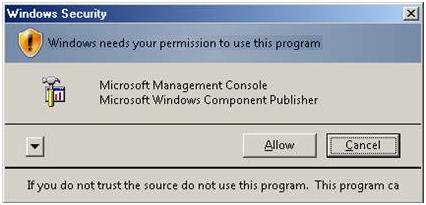
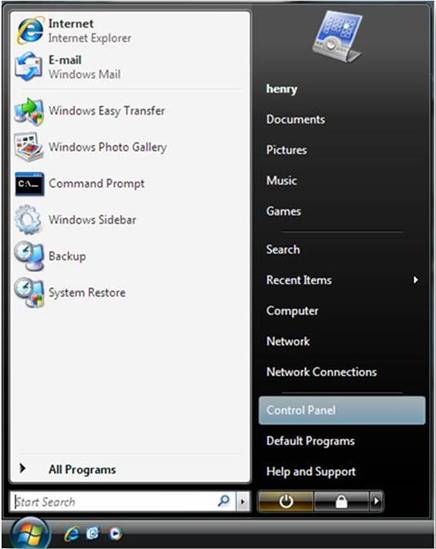
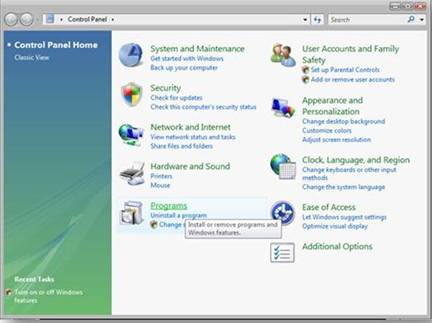
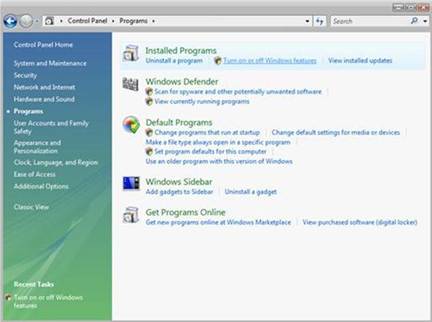
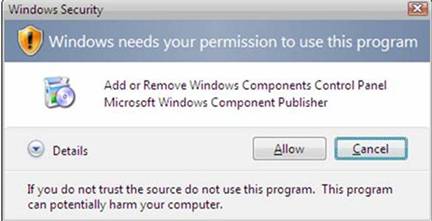
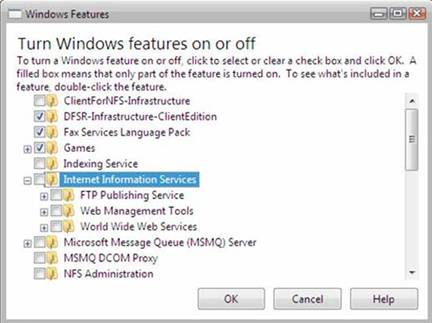
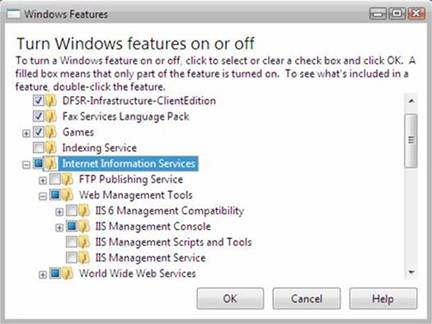
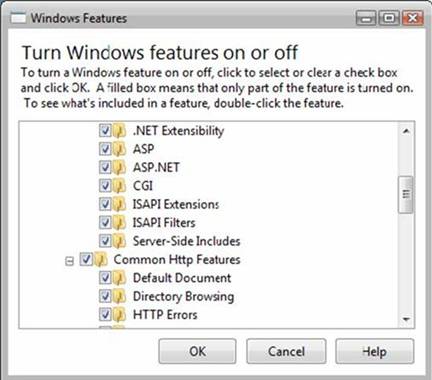
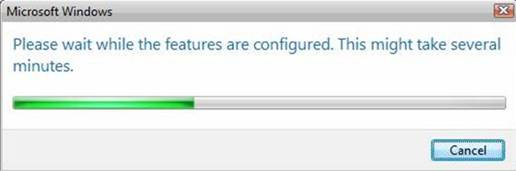
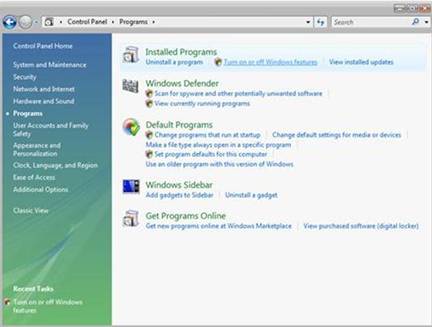
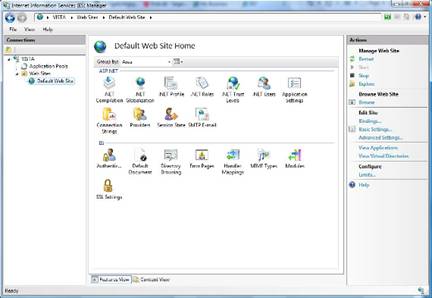
If you choose to install IIS 7.0 or above manually, you can use this article for guidance.
Before You Begin
Ensure that you have installed one of the editions of Windows Vista or Windows 7 on which IIS 7 and above is supported before you proceed. Not all IIS features are supported on all editions of Windows Vista and Windows 7. Home Basic and Starter editions include only limited basic features of IIS. To see a list of which features are supported on the edition of Windows you are using, see one of the following:- Available Role Services in IIS 7.0 (Windows Vista)
- Available Web Server (IIS) Role Services in IIS 7.5 (Windows 7)
terça-feira, setembro 25, 2012
How Application Pools Work (IIS 6.0
When you run IIS 6.0 in worker process isolation mode, you can separate
different Web applications and Web sites into groups known as application
pools. An application pool is a group of one or more URLs that are
served by a worker process or set of worker processes. Any Web directory or
virtual directory can be assigned to an application pool.
Every application within an application pool shares the same worker process. Because each worker process operates as a separate instance of the worker process executable, W3wp.exe, the worker process that services one application pool is separated from the worker process that services another. Each separate worker process provides a process boundary so that when an application is assigned to one application pool, problems in other application pools do not affect the application. This ensures that if a worker process fails, it does not affect the applications running in other application pools.
Use multiple application pools when you want to help ensure that applications and Web sites are confidential and secure. For example, an enterprise organization might place its human resources Web site and its finance Web site on the same server, but in different application pools. Likewise, an ISP that hosts Web sites and applications for competing companies might run each companys Web services on the same server, but in different application pools. Using different application pools to isolate applications helps prevent one customer from accessing, changing, or using confidential information from another customers site.
In HTTP.sys, an application pool is represented by a request queue, from which the user-mode worker processes that service an application pool collect the requests. Each pool can manage requests for one or more unique Web applications, which you assign to the application pool based on their URLs. Application pools, then, are essentially worker process configurations that service groups of namespaces.
Multiple application pools can operate at the same time. An application, as defined by its URL, can only be served by one application pool at any time. While one application pool is servicing a request, you cannot route the request to another application pool. However, you can assign applications to another application pool while the server is running.
by http://www.microsoft.com/technet/prodtechnol/WindowsServer2003/Library/IIS/67e39bd8-317e-4cf6-b675-6431d4425248.mspx?mfr=true
Every application within an application pool shares the same worker process. Because each worker process operates as a separate instance of the worker process executable, W3wp.exe, the worker process that services one application pool is separated from the worker process that services another. Each separate worker process provides a process boundary so that when an application is assigned to one application pool, problems in other application pools do not affect the application. This ensures that if a worker process fails, it does not affect the applications running in other application pools.
Use multiple application pools when you want to help ensure that applications and Web sites are confidential and secure. For example, an enterprise organization might place its human resources Web site and its finance Web site on the same server, but in different application pools. Likewise, an ISP that hosts Web sites and applications for competing companies might run each companys Web services on the same server, but in different application pools. Using different application pools to isolate applications helps prevent one customer from accessing, changing, or using confidential information from another customers site.
In HTTP.sys, an application pool is represented by a request queue, from which the user-mode worker processes that service an application pool collect the requests. Each pool can manage requests for one or more unique Web applications, which you assign to the application pool based on their URLs. Application pools, then, are essentially worker process configurations that service groups of namespaces.
Multiple application pools can operate at the same time. An application, as defined by its URL, can only be served by one application pool at any time. While one application pool is servicing a request, you cannot route the request to another application pool. However, you can assign applications to another application pool while the server is running.
by http://www.microsoft.com/technet/prodtechnol/WindowsServer2003/Library/IIS/67e39bd8-317e-4cf6-b675-6431d4425248.mspx?mfr=true
What is Application Pool in IIS ?
Before Giving the Definition : you can say like this, Concept of Application pool has from IIS 6.0 .
Application pools are used to separate sets of IIS worker processes that share the same configuration and application boundaries. Application pools used to isolate our web application for better security, reliability, and availability and performance and keep running with out impacting each other . The worker process serves as the process boundary that separates each application pool so that when one worker process or application is having an issue or recycles, other applications or worker processes are not affected.
One Application Pool can have multiple worker process Also.
Main Point to Remember:
1. Isolation of Different Web Application
2. Individual worker process for different web application
3. More reliably web application
4. Better Performance
by http://www.dotnetfunda.com/interview/exam1414-what-is-application-pool-in-iis.aspx
Application pools are used to separate sets of IIS worker processes that share the same configuration and application boundaries. Application pools used to isolate our web application for better security, reliability, and availability and performance and keep running with out impacting each other . The worker process serves as the process boundary that separates each application pool so that when one worker process or application is having an issue or recycles, other applications or worker processes are not affected.
One Application Pool can have multiple worker process Also.
Main Point to Remember:
1. Isolation of Different Web Application
2. Individual worker process for different web application
3. More reliably web application
4. Better Performance
by http://www.dotnetfunda.com/interview/exam1414-what-is-application-pool-in-iis.aspx
segunda-feira, setembro 17, 2012
Pesquisa em ficheiros do fim para o ínicio
Sempre que preciso de pesquisar num ficheiro com demasiadas linhas tenho sempre o problema de encontrar o que quero.
O problema é que o grep obriga a saber o que pesquisar - e por vezes não se sabe.
Para ver um ficheiro do fim para o final:
less +G extractor.log
quinta-feira, setembro 13, 2012
Procurar ficheiros numa máquina recursivamente
Para proceder a pesquisa de ficheiros recursivamente:
find . -name '*.tar'
find . -name '*.tar'
Subscrever:
Mensagens (Atom)